Feature Announcement

Product Update: New Timeline Editor

Product Update: New Timeline Editor

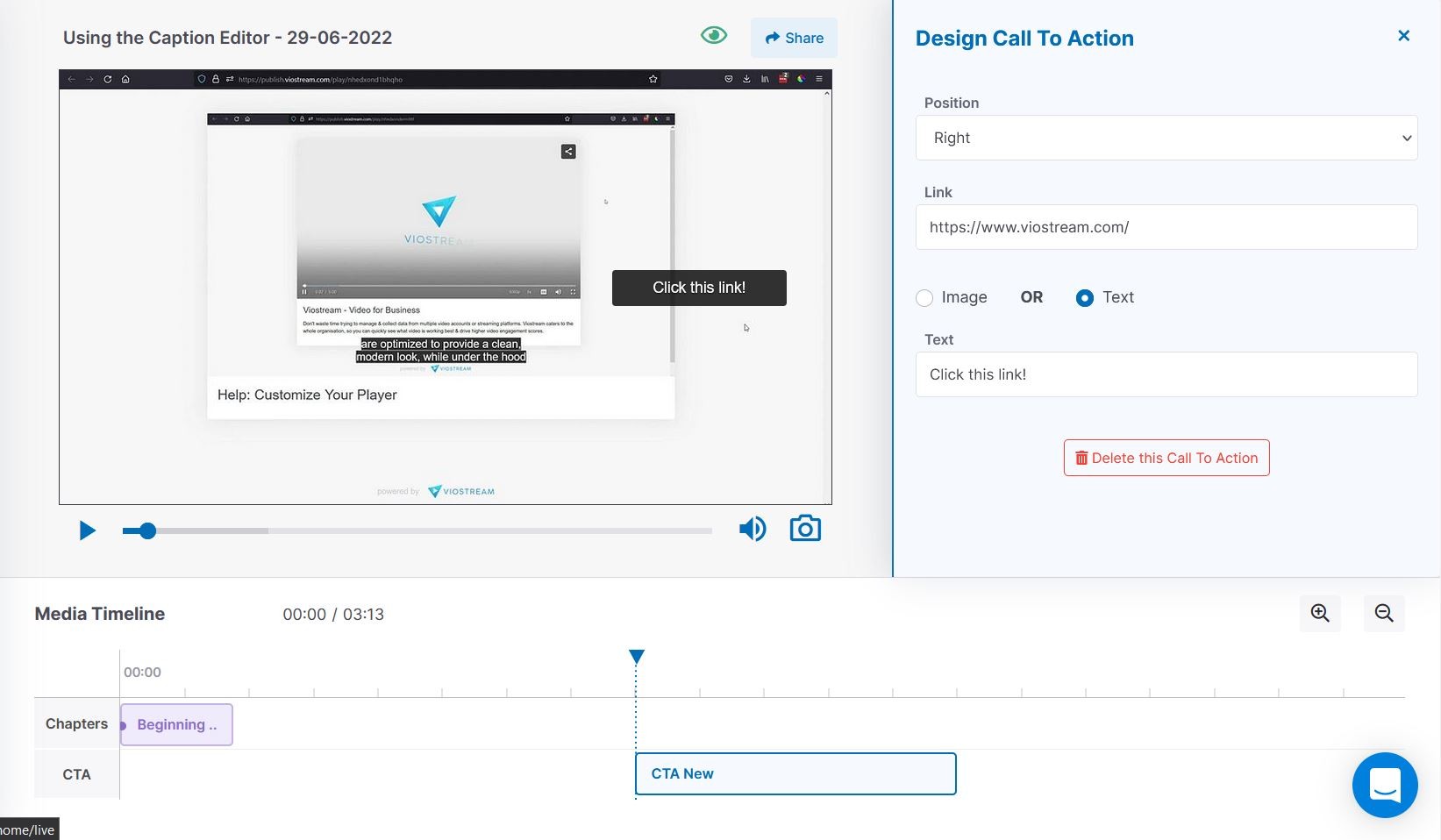
Viostream's new Timeline Editor creates an easy and tactile process to make your videos engaging and accessible. Link other pages with our Calls to Actions, and organize your video into sections with our Chapters. Both of these features are made with a few button clicks and can be adjust simply by dragging blocks along the timeline. Real-time visual feedback is at the core of our tools so you know exactly what your content will look like before publishing.

Viostream's new Timeline Editor creates an easy and tactile process to make your videos engaging and accessible. Link other pages with our Calls to Actions, and organize your video into sections with our Chapters. Both of these features are made with a few button clicks and can be adjust simply by dragging blocks along the timeline. Real-time visual feedback is at the core of our tools so you know exactly what your content will look like before publishing.

Published:

3

minute read

Viostream has developed a new visual and responsive UI that will enable you to manage your content far more effectively, freeing up your time to work on your next video.

The first thing to notice is the newly added Timeline Editor, which displays both the Calls to Action (CTAs) and Chapters added to your entire video. This Timeline isn’t just a visual representation of your video’s CTAs and Chapters, it allows direct interaction and adjustment with real-time feedback in the displayed Player.

Calls to Action and Chapters

With the new Timeline editor, we aim to make the editing process far simpler and tactile than ever before. 

Creating the Calls to Action and Chapters as blocks on the timeline is so easy, as you can now drag them around the timeline to re-time when they appear in the video. Just simply double click on the timeline where you want the block to begin, and give it a title. 

The CTAs have the ability to display either a text pop-up or an image that you upload. You can also re-time the CTA blocks incredibly quickly just by dragging the box to be longer or shorter along the timeline.

Conclusion

The new Timeline Editor is a fantastic new addition to the Viostream platform that allows your video content to be more accessible with a smooth learning curve. This isn’t the only addition worth celebrating however; along with the new timeline, our new Caption Editor is also releasing as well as our Media Library overhaul.

If you want to try out these new features for yourself, don’t forget to start a Viostream free account and explore the platform.


Ready to get started?

Start making more out of video, today. Deliver secure, ad-free videos to anyone, anywhere. Measure, track, and analyze viewer engagement on every single video, and evaluate performance with absolute ease!

Ready to get started?

Start making more out of video, today. Deliver secure, ad-free videos to anyone, anywhere. Measure, track, and analyze viewer engagement on every single video, and evaluate performance with absolute ease!

Ready to get started?

Start making more out of video, today. Deliver secure, ad-free videos to anyone, anywhere. Measure, track, and analyze viewer engagement on every single video, and evaluate performance with absolute ease!

Ready to get started?

Start making more out of video, today. Deliver secure, ad-free videos to anyone, anywhere. Measure, track, and analyze viewer engagement on every single video, and evaluate performance with absolute ease!

© Copyright 2026, All Rights Reserved by Viostream

© Copyright 2026, All Rights Reserved by Viostream

© Copyright 2026, All Rights Reserved by Viostream

© Copyright 2026, All Rights Reserved by Viostream